order date
Subscriber
P. Method
P. Status
amount
bc order#
status
- Today
- Yesterday
- Last 7 Days
- Last 30 Days
- Month to Date
- Year to Date
- Specific Date
- Date Range
- All Dates Since
order date
Subscriber
P. Method
P. Status
amount
bc order#
status
- Today
- Yesterday
- Last 7 Days
- Last 30 Days
- Month to Date
- Year to Date
- Specific Date
- Date Range
- All Dates Since
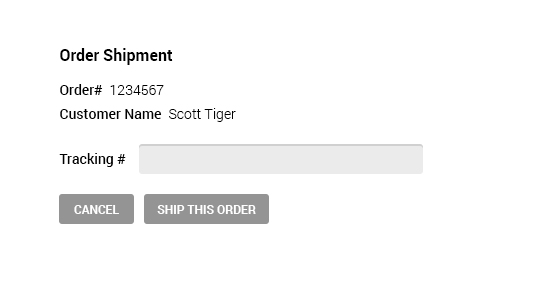
Note for Developer: This tab will displayed only if "Authorized Only" setting is enabled with any payment method.
order date
Subscriber
P. Method
P. Status
amount
bc order#
status
- Today
- Yesterday
- Last 7 Days
- Last 30 Days
- Month to Date
- Year to Date
- Specific Date
- Date Range
- All Dates Since
order date
Subscriber
P. Method
P. Status
amount
bc order#
status
- Today
- Yesterday
- Last 7 Days
- Last 30 Days
- Month to Date
- Year to Date
- Specific Date
- Date Range
- All Dates Since
order date
Subscriber
P. Method
P. Status
amount
bc order#
status
- Today
- Yesterday
- Last 7 Days
- Last 30 Days
- Month to Date
- Year to Date
- Specific Date
- Date Range
- All Dates Since
order date
Subscriber
P. Method
P. Status
amount
bc order#
status
nov 16, 2018 09:12:28
name@mail.com
american express
Partially Refunded
$25.00
4548421
Refunded
VIEW
- Today
- Yesterday
- Last 7 Days
- Last 30 Days
- Month to Date
- Year to Date
- Specific Date
- Date Range
- All Dates Since
order date
Subscriber
P. Method
P. Status
amount
bc order#
status
nov 16, 2018 09:9:28
name@mail.com
american express
Declined
$25.00
4548421
Declined
Update Payment
VIEW
nov 16, 2018 09:12:28
name@mail.com
american express
Declined
$25.00
4548421
Declined
Update Payment
VIEW
nov 16, 2018 09:12:28
name@mail.com
american express
Declined
$25.00
4548421
Declined
Update Payment
VIEW
- Today
- Yesterday
- Last 7 Days
- Last 30 Days
- Month to Date
- Year to Date
- Specific Date
- Date Range
- All Dates Since
order date
Subscriber
P. Method
P. Status
amount
bc order#
status
- Today
- Yesterday
- Last 7 Days
- Last 30 Days
- Month to Date
- Year to Date
- Specific Date
- Date Range
- All Dates Since
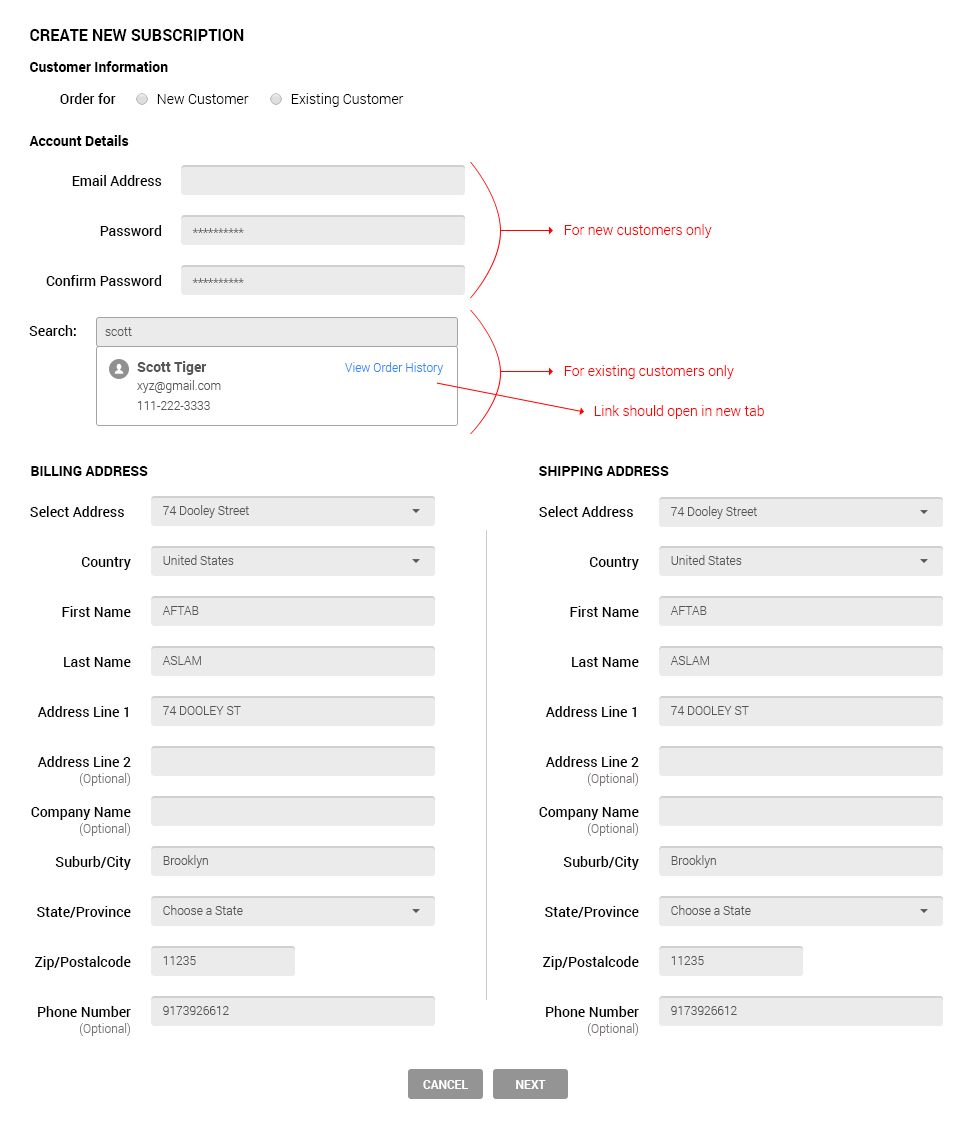
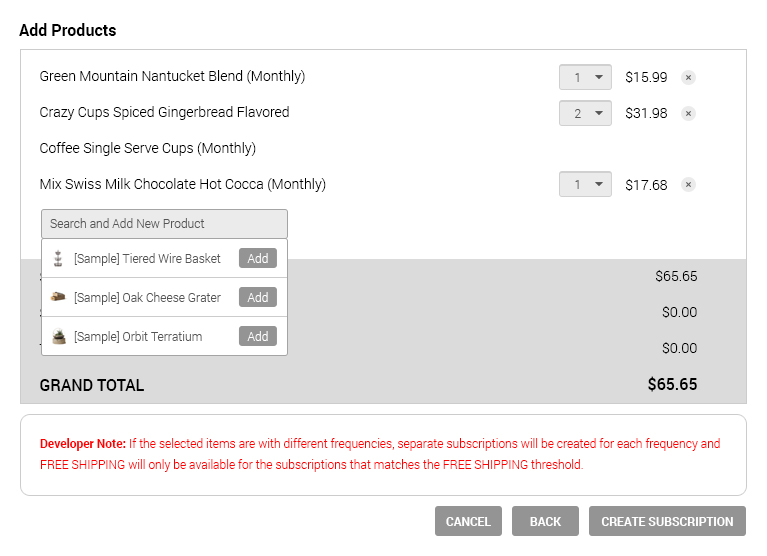
You can create recurring order by adding an order from Bigcommerce dashboard under Orders -> Add. Make sure to select frequency option for the subscription products. If you do not select the frequency option, the specific product will be not be included into recurring orders.
Step 1
Step 2
Step 3